---
title: How do I request an authentication code and register my computer?
description: How do I request an authentication code and register my computer?
---
[Skip to content](https://infobase.credittechnologies.com/how-do-i-request-an-authentication-code-and-register-my-computer#main-content)
English
Show submenu for translations
[Contact us](https://infobase.credittechnologies.com/kb-tickets/new?hsLang=en)
![logo-credit-tech.png\]](https://infobase.credittechnologies.com/hs-fs/hubfs/logos/logo-credit-tech.png?height=30&name=logo-credit-tech.png)
Open main navigation
Close main navigation
- English
Show submenu for translations
- [Contact us](https://infobase.credittechnologies.com/kb-tickets/new)
- [Go to credittechnologies.com](https://www.credittechnologies.com/)
[Go to credittechnologies.com](https://www.credittechnologies.com/)
Hello. How can we help you?
- There are no suggestions because the search field is empty.
1. [Help Center](https://infobase.credittechnologies.com/?hsLang=en)
2. [Credit Technologies](https://infobase.credittechnologies.com/credit-technologies?hsLang=en)
3. [Technical Support](https://infobase.credittechnologies.com/credit-technologies?hsLang=en#technical-support)
# How do I request an authentication code and register my computer?
The site security certificate is used in conjunction with the authentication code and enables MCL to remember your computer’s IP address. Once your IP address is registered, you will no longer be prompted to input the authentication code.
1. Log into MCL with your user name and password.
2. You will be brought to the Site Security Authentication screen. Follow the steps on the screen below:
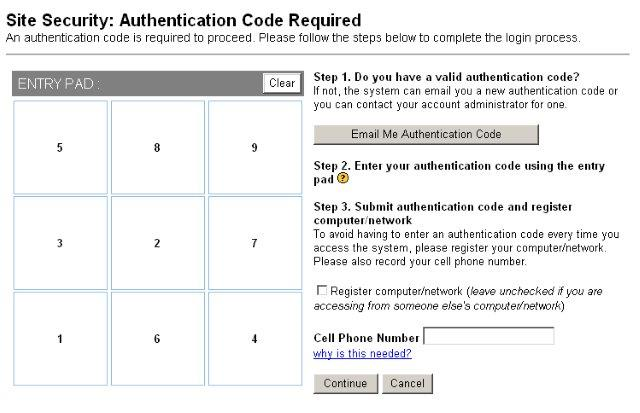
1. Click the Email Me Authentication Code button to obtain a new authentication code to enter the MCL system. If your cell phone number is saved to your user account you can receive an authentication code by text instead. *If both your email and cell phone number are unavailable, you will need to contact your administrator for an authentication code.*
2. After obtaining your authentication code, enter it into the Entry Pad on the left side of the screen using the numbered buttons.
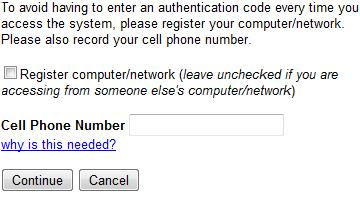
3. If you wish to register your current computer with MCL so you don’t have to do steps 2-4 each time you log in, please check the “Register computer/network” checkbox before you click the Continue button.
- [Credit Technologies](https://infobase.credittechnologies.com/credit-technologies?hsLang=en#main-content)
- [Accounting](https://infobase.credittechnologies.com/credit-technologies?hsLang=en#accounting)
- [Client Support](https://infobase.credittechnologies.com/credit-technologies?hsLang=en#client-support)
- [Consumer](https://infobase.credittechnologies.com/credit-technologies?hsLang=en#consumer)
- [Products & Services](https://infobase.credittechnologies.com/credit-technologies?hsLang=en#products-services)
- [Score Express](https://infobase.credittechnologies.com/credit-technologies?hsLang=en#score-express)
- [Technical Support](https://infobase.credittechnologies.com/credit-technologies?hsLang=en#technical-support)
- [Training](https://infobase.credittechnologies.com/credit-technologies?hsLang=en#training)
- [Preflight](https://infobase.credittechnologies.com/preflight?hsLang=en#main-content)
- [Consumers](https://infobase.credittechnologies.com/preflight?hsLang=en#consumers)
- [For Sale by Owner](https://infobase.credittechnologies.com/preflight?hsLang=en#for-sale-by-owner)
- [Lenders](https://infobase.credittechnologies.com/preflight?hsLang=en#lenders)
[](https://www.credittechnologies.com/)
credittechnologies.com Help Center
Copyright © 2026, Credit Technologies, Inc.